Welcome to DU! The truly grassroots left-of-center political community where regular people, not algorithms, drive the discussions and set the standards. Join the community: Create a free account Support DU (and get rid of ads!): Become a Star Member Latest Breaking News Editorials & Other Articles General Discussion The DU Lounge All Forums Issue Forums Culture Forums Alliance Forums Region Forums Support Forums Help & Search

discntnt_irny_srcsm

(18,786 posts)
16. If it is notepad...
Sat Mar 31, 2012, 01:30 AM
Mar 2012

...that you are "pasting" into, that is the problem. Notepad supports text only. To save an image, you need a application that supports images like MS-Paint. If you are getting no result pasting a copied image into Paint then the copy process must be the problem.

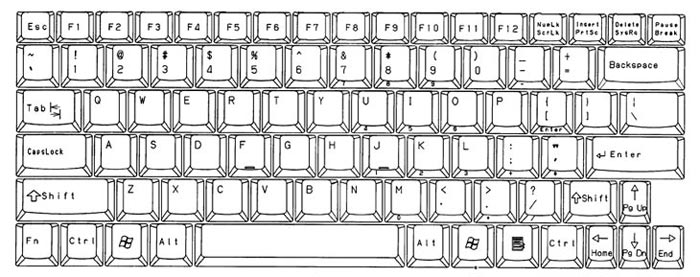
I'm using a HP ProBook Laptop. For me to access the <prt sc> button, I need to hold down the <fn> key near the lower left of the keyboard. Therefore, on my ProBook, I hold down the <alt> <fn> and then press the <prt sc> key momentarily. Then I <ctrl> <v> in MS-Paint and an image is visible. I can then save the image.

<ctrl> <fn> <prt sc> captures my whole desktop.
<alt> <fn> <prt sc> captures only the foreground window.


___________________________________________________________________________________
Full sized keyboards don't require the <fn> key to access the 'print screen' function but many laptops do.


Hope this helps.

Recommendations

0 members have recommended this reply (displayed in chronological order):

When you say that you made a screenshot, do you mean you petronius Mar 2012 #1
When you snap a screenshot it gets copied to the clipboard. Old and In the Way Mar 2012 #2
Not on my system it doesn't. On my mac it would, truedelphi Mar 2012 #7
Unless you have additional software installed, ManiacJoe Mar 2012 #8
There is no file extension. It is CF_DIB file format. Once you save it there is a file extension. Kennah Mar 2012 #9
My big problem is I am having a lot of problems with this computer. truedelphi Mar 2012 #10
To my knowledge ... Kennah Mar 2012 #11
The "clipboard" refers to the paste buffer. ElboRuum Mar 2012 #12
Okay how can I make myself more clear than I have been making it? truedelphi Mar 2012 #14
You have made yourself abundantly clear. ElboRuum Mar 2012 #15
Okay, thanks. I think now we might be able to get somewhere. truedelphi Mar 2012 #17
This extra info helps a lot. ManiacJoe Apr 2012 #18
That's a tougher matter... ElboRuum Apr 2012 #19
I hate hearing things like that - I assume having this done the truedelphi Apr 2012 #22
Are you specifically wanting... discntnt_irny_srcsm Apr 2012 #20
If it is notepad... discntnt_irny_srcsm Mar 2012 #16
Try this link for info savalez Mar 2012 #3
You need to paste it into a graphics program and save it. RC Mar 2012 #4
+ 1 to Irfanview, plus it's freeware. n/t Earth Bound Misfit Mar 2012 #5
Thank you. truedelphi Mar 2012 #6
Ditto + 1 to Irfanview, plus it's freeware. n/t aptal Mar 2012 #13
Pardon me for being so mentally dense here but... discntnt_irny_srcsm Apr 2012 #21
Latest Discussions»Help & Search»Computer Help and Support»What extension will a &qu...»Reply #16