Democratic Underground Latest Greatest Lobby Journals Search Options Help Login
Google

question about Windows XP desktop toolbar/taskbar

Printer-friendly format Printer-friendly format
Printer-friendly format Email this thread to a friend
Printer-friendly format Bookmark this thread
Home » Discuss » DU Groups » Computers & Internet » Computer Help and Support Group Donate to DU
 
Soylent Brice Donating Member (1000+ posts) Send PM | Profile | Ignore Wed Aug-26-09 09:11 PM
Original message
question about Windows XP desktop toolbar/taskbar
how do you customize color and appearance of menu toolbars for Windows XP?

aside from the standard options available like classic, and the silver green and blue.


are there any other options? i have Windows XP 64 bit.


everything i pull up on google is no help at all. mostly help for 2007 Vista.

thanks!

Refresh | 0 Recommendations Printer Friendly | Permalink | Reply | Top
RoyGBiv Donating Member (1000+ posts) Send PM | Profile | Ignore Wed Aug-26-09 10:19 PM
Response to Original message
1. You want free or to pay for it?
If you're willing to pay for it, it's fairly simple. There are a couple of popular applications that'll do this, complete with custom themes to customize all sorts of stuff about your desktop.

StyleXP: http://www.tgtsoft.com/

WindowBlinds: http://www.stardock.com/products/windowblinds/

All these things do is utilize some "hidden" "features" of WindowsXP, which is to say they manipulate system files and such. You can do this yourself, but you have to know what you're changing.

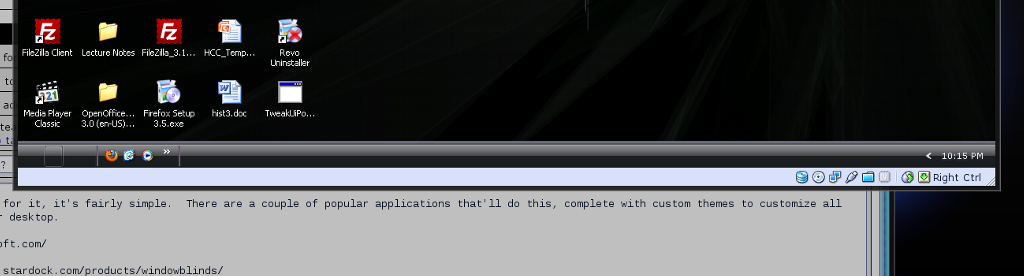
I've got my Windows virtual machine customized into an all-black taskbar for some reason ...


I don't even remember doing it actually. Musta been bored. :) What this means is I don't remember the exact process. (One of the benefits of a Linux machine is that changing your desktop's look-and-feel is a bit more straightforward.) If you want the free route, I'll see if I can dig up what I did.
Printer Friendly | Permalink | Reply | Top
 
Soylent Brice Donating Member (1000+ posts) Send PM | Profile | Ignore Thu Aug-27-09 07:38 AM
Response to Reply #1
6. that's what i was looking for!! thank you!!!
that tgtsoft one looks neat.

Printer Friendly | Permalink | Reply | Top
 
RoyGBiv Donating Member (1000+ posts) Send PM | Profile | Ignore Wed Aug-26-09 10:23 PM
Response to Original message
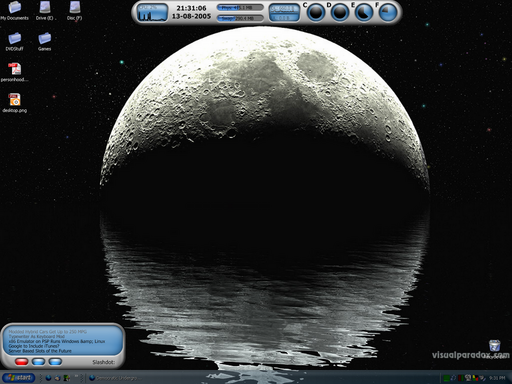
2. Old Screenshot
Edited on Wed Aug-26-09 10:25 PM by RoyGBiv
Just found this in my PhotoBucket account ...

Here's a screenshot of my old Windows box. This was done with StyleXP, IIRC.


From the date, I see it's just a few days over four years old. August seems to be my month for screwing around with my desktop appearance ... oh, who am I kidding. I play with eye candy more than I should. Anyway ...

I had customized icons and was using a fading option in StyleXP for the taskbar, which is why it looks, well, faded. The desktop widgets (and rss reader and system info display) were from something else ... don't remember what.

Printer Friendly | Permalink | Reply | Top
 
jayfish Donating Member (1000+ posts) Send PM | Profile | Ignore Tue Sep-01-09 06:43 PM
Response to Reply #2
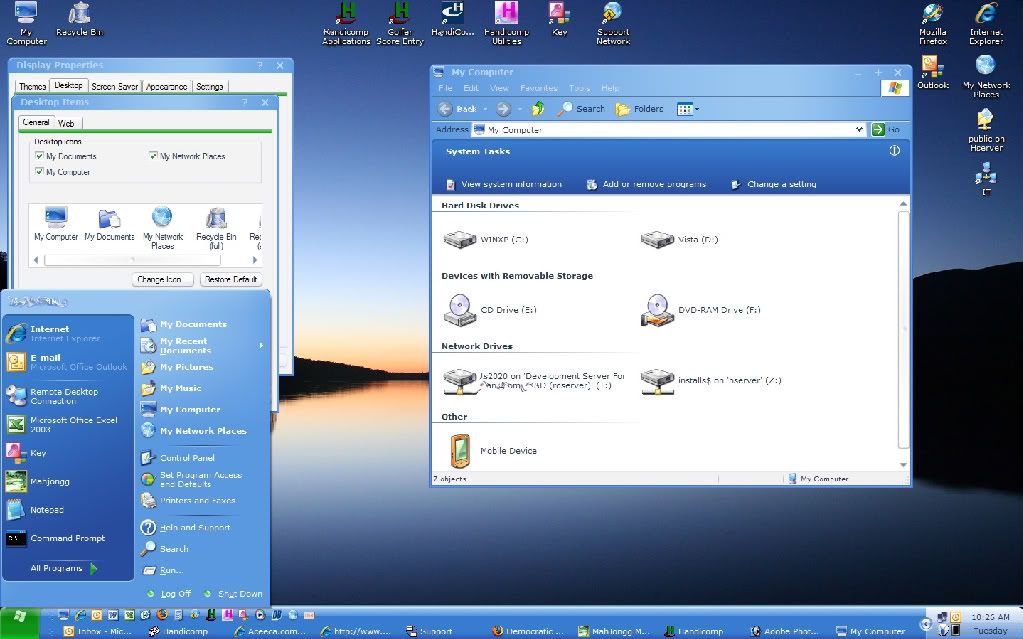
7. Another StyleXP Desktop.
Edited on Tue Sep-01-09 06:53 PM by jayfish


When it worked correctly it was very nice.

Jay

ON EDIT: The custom icons were not a part of StyleXP.
Printer Friendly | Permalink | Reply | Top
 
Why Syzygy Donating Member (1000+ posts) Send PM | Profile | Ignore Wed Aug-26-09 10:24 PM
Response to Original message
3. Not sure I understand your question...
but, I wonder if what you're looking for is found in
right-click Desktop > Properties > Appearance > Advanced
Printer Friendly | Permalink | Reply | Top
 
RoyGBiv Donating Member (1000+ posts) Send PM | Profile | Ignore Wed Aug-26-09 10:28 PM
Response to Reply #3
4. What you can do there is limited ...

... at least until you've messed around with some system files.

MS went out of its way to force a certain look-and-feel on users without paying for the privilege.

Printer Friendly | Permalink | Reply | Top
 
Why Syzygy Donating Member (1000+ posts) Send PM | Profile | Ignore Wed Aug-26-09 10:30 PM
Response to Reply #4
5. I spend most of my time looking at my browser..
and there are severl skins for it. Could even make one if I was into that.
Printer Friendly | Permalink | Reply | Top
 
RoyGBiv Donating Member (1000+ posts) Send PM | Profile | Ignore Mon Sep-21-09 12:43 AM
Response to Original message
8. Update

I spent some time on my Windows box this weekend and decided to figure out how I did this without additional software.

It's a matter of patching the uxtheme.dll file.

You can do it easily with Multi-Patcher

http://www.softpedia.com/get/System/OS-Enhancements/UXTheme-MultiPatcher.shtml

This allows you to use themes made for things like StyleXP without actually having StyleXP. Of course you don't get the additional features of those packages (transparency, easier changing of boot screens, etc.) but if all you're wanting to do is change the theme, this does the trick.

After running the Multi-Patch program, which, as you will be instructed, requires you to ignore Windows warning you that you're changing a system file, you reboot and can then install various themes and change to them via desktop options.

Printer Friendly | Permalink | Reply | Top
 
DU AdBot (1000+ posts) Click to send private message to this author Click to view 
this author's profile Click to add 
this author to your buddy list Click to add 
this author to your Ignore list Wed Dec 24th 2025, 04:50 PM
Response to Original message
Advertisements [?]
 Top

Home » Discuss » DU Groups » Computers & Internet » Computer Help and Support Group Donate to DU

Powered by DCForum+ Version 1.1 Copyright 1997-2002 DCScripts.com
Software has been extensively modified by the DU administrators


Important Notices: By participating on this discussion board, visitors agree to abide by the rules outlined on our Rules page. Messages posted on the Democratic Underground Discussion Forums are the opinions of the individuals who post them, and do not necessarily represent the opinions of Democratic Underground, LLC.

Home  |  Discussion Forums  |  Journals |  Store  |  Donate

About DU  |  Contact Us  |  Privacy Policy

Got a message for Democratic Underground? Click here to send us a message.

© 2001 - 2011 Democratic Underground, LLC