The DU Lounge
Related: Culture Forums, Support ForumsDU new look on Firefox via android
I did absolutely nothing. But my usual way of checking in is via Firefox. It is saved to my homepage with other sites like Alternet, TPM, Dailykos, etc.
Today I got this new look...

Usually it appears like this (which I'm signed into via Duckduckgo.)

I much prefer the 2nd look.
Anybody else experience this today?
 = new reply since forum marked as read
Highlight:
NoneDon't highlight anything
5 newestHighlight 5 most recent replies
= new reply since forum marked as read
Highlight:
NoneDon't highlight anything
5 newestHighlight 5 most recent replies
callous taoboy
(4,797 posts)and now I can't get it back. This is only on my iMac, not my Mac laptop. Frustrating.

Mister Ed
(6,991 posts)
EarlG
(23,710 posts)I have no idea why that is happening. We have not made any changes at our end.
It looks like you are using a small device but that’s about all I can tell. Can you tell me the model of the phone?

SleeplessinSoCal
(10,439 posts)It was normal last night. I might try uninstalling the Firefox app and reinstalling it. Will do that later.
Perplexing.
SleeplessinSoCal
(10,439 posts)But I discovered going to DU via Google search gives me the original look. So it's only Firefox via Android where this strange look appears.
SleeplessinSoCal
(10,439 posts)I'll try to write to the support team and see if they know what happened.
SleeplessinSoCal
(10,439 posts)Looks a little different with the new Firefox app, but the layout is back. Apparently under Settings >Accessibility > Font, nothing was selected. If you go with a font larger than 145% I get that vertical stack. Or with automatic font sizing.
usonian
(26,593 posts)You'll have to log in again.
I'm just throwing this out here to show what DU looks like in dark mode. (Go Dark Brandon!)
Safari on MacOS Ventura.
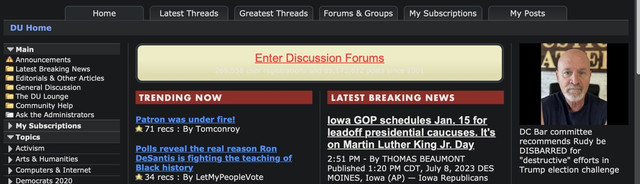
And on mobile ios16

callous taoboy
(4,797 posts)Yeah! Thanks. Now, I need to see if I can figure out Dark Brandon mode.
callous taoboy
(4,797 posts)usonian
(26,593 posts)Free from the App Store with optional IAP's which I ignore. (on the Mac)
That said, I noticed the regular screen on the phone this morning, so I checked Safari extensions on the phone and Dark Night showed up. I turned it back on.
Just shop around for extensions and one or more dark mode extensions will show up.
I am using the dark mode on the Mac itself, and it's very good to my eyes.
Since the world is inconsistent, and computers even more so, I just try things until one works and forget what I did.
That said, I am in "Dark Brandon" mode all around right now.
HTH
I might have turned dark mode off with the phone Safari when some colors became hard to see, since they were programmed before anyone ever used dark mode.
callous taoboy
(4,797 posts)I just got the app ($3.99) and am using it now. Way better on the eyes! One weird glitch is the tabs on DU are all blank white. Everything else looks normal. Did you have that issue?
Thanks again!
usonian
(26,593 posts)My tabs are per the screenshots just above. White text on black tab.

Lars39
(26,553 posts)

Nictuku
(4,682 posts)I know this is probably not relevant, but it might help the folks running the site with a baseline for Firesox/Win11: I've not seen any changes recently, other than a smaller font overall, and it is possible that I did that myself, (easy to correct).

Kick in to the DU tip jar?
This week we're running a special pop-up mini fund drive. From Monday through Friday we're going ad-free for all registered members, and we're asking you to kick in to the DU tip jar to support the site and keep us financially healthy.
As a bonus, making a contribution will allow you to leave kudos for another DU member, and at the end of the week we'll recognize the DUers who you think make this community great.