Umm OK ... so I'm still getting updates for WinXP.
MS support was announced to end April 8. Got new updates yesterday (4/9) and today (4/10). What gives ?
If I keep accepting these updates, am I likely to be spoofed ?
 = new reply since forum marked as read
Highlight:
NoneDon't highlight anything
5 newestHighlight 5 most recent replies
= new reply since forum marked as read
Highlight:
NoneDon't highlight anything
5 newestHighlight 5 most recent replies

rocktivity
(45,008 posts)Count your blessings, don't look a gift Windows OS in the mouth, and stuff like that!

rocktivity

steve2470
(37,481 posts)Do you have the KB (knowledge base) article numbers ?

eppur_se_muova
(42,518 posts)steve2470
(37,481 posts)Read that, please. Each update will have a KB number. You can google the KB number and find out all the details.
eppur_se_muova
(42,518 posts)That shows a huge pile of info, sorted by date.
I think my question was answered in reply #4; apparently I jumped to a conclusion too soon. But this may be useful info to have.
steve2470
(37,481 posts)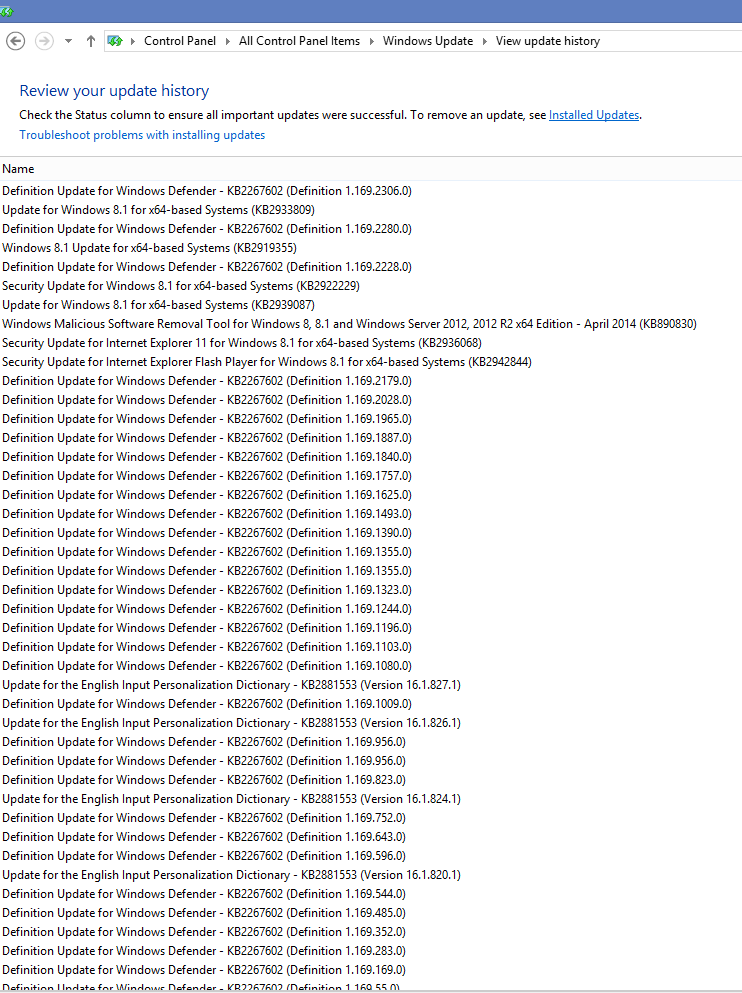
It's a screenshot of my Win8.1 Windows Update window. It should be very similar in Win7 and even in WinXP. See the KB numbers ? You can google those or just go to the Microsoft site and do a search.
eppur_se_muova
(42,518 posts)I can see my update history on MS's update page, so now I have those KB numbers. But there's no Windows Update Control Panel in XP, so (apparently) the .log file is the only list that's actually on my computer.
As it turns out, it's not going to matter much longer. I've discovered Linux Mint and will (eventually) drag the rest of the family over. And my suspicions about these updates have been alleviated.
steve2470
(37,481 posts)For: Windows XP Professional and Home Edition
Before Windows XP SP2, in the Add or Remove Programs control panel the Microsoft updates that were applied to your system would show in here. This is great if want to see what patches were applied to your system. Although it was annoying if you had to scroll through the list trying to find the program that you wanted to remove, and accidentally removed a system patch or service pack.
In SP2 a new feature prevent the system updates from being displayed in the list by default. So if you want to see the system date you have enable this feature.
- Open the Control Panel folder
- Open the Add or Remove Programs control panel
- At the top of the Add or Remove Programs window, check the "Show updates" checkbox.
You're now able to scroll down and see the system updates intermixed with the other programs.
eppur_se_muova
(42,518 posts)
ManiacJoe
(10,138 posts)The rollout to customers is staggered over the week so that the internet is not flooded with traffic.
This is the last month that will contain updates for Windows XP. MS Office and other software you may have will continue to be updated each month.
eppur_se_muova
(42,518 posts)I quit wondering when the second one arrived. Looks like that was premature.

Kick in to the DU tip jar?
This week we're running a special pop-up mini fund drive. From Monday through Friday we're going ad-free for all registered members, and we're asking you to kick in to the DU tip jar to support the site and keep us financially healthy.
As a bonus, making a contribution will allow you to leave kudos for another DU member, and at the end of the week we'll recognize the DUers who you think make this community great.