Apple Users
Related: About this forumMy iPhone won't turn to landscape
I'm sure I hit a button without realizing it. Turning the phone sideways won't display in landscape. Any help appreciated. Thanks.
 = new reply since forum marked as read
Highlight:
NoneDon't highlight anything
5 newestHighlight 5 most recent replies
= new reply since forum marked as read
Highlight:
NoneDon't highlight anything
5 newestHighlight 5 most recent replies
Effete Snob
(8,387 posts)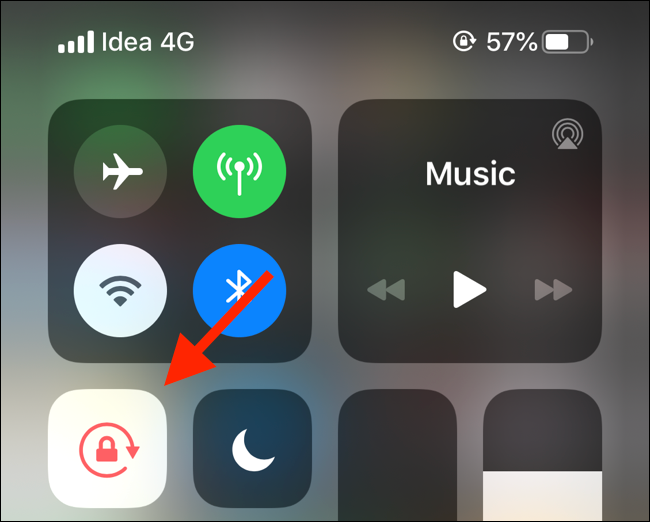
That button there when you swipe down the control screen.

wryter2000
(47,940 posts)I’m sure I bumped that button by mistake. Fixed now

dweller
(28,681 posts)Look for circular arrow with lock on it
Unlock
✌🏻

hlthe2b
(114,679 posts)
wryter2000
(47,940 posts)DU saves me from headaches

unc70
(6,514 posts)The controls are displayed as described above.

yorkster
(3,951 posts)
LT Barclay
(3,202 posts)Effete Snob
(8,387 posts)I've got mine to the point where if I give it "the look", it will quite fooling around.
LT Barclay
(3,202 posts)
crud
(1,282 posts)clever "intuitive" interfaces never seem to be that intuitive. hundreds of options and preferences in hidden and obscure places. And everything changes with a new update. It is a full time job just to understand how to work your phone, and seems like you'll never fully know how to use every function or ap. Okay, rant over.

Tetrachloride
(9,703 posts)Response to wryter2000 (Original post)
Mme. Defarge This message was self-deleted by its author.

usonian
(26,591 posts)There's a gravity sensor inside, and you can't open these things up for the WD-40 treatment 
Not sure what the sensor is, but between hardware and software .... WHAT COULD GO WRONG?
things sometimes things just need a restart.
My experience is that violence never fixes these things, no matter how good it feels.

Kick in to the DU tip jar?
This week we're running a special pop-up mini fund drive. From Monday through Friday we're going ad-free for all registered members, and we're asking you to kick in to the DU tip jar to support the site and keep us financially healthy.
As a bonus, making a contribution will allow you to leave kudos for another DU member, and at the end of the week we'll recognize the DUers who you think make this community great.