SMS Phishers Pivot to Points, Taxes, Fake Retailers ( BEWARE of text messages!) [View all]
Posted in GD because it's everywhere, and everyone gets these.
https://krebsonsecurity.com/2025/12/sms-phishers-pivot-to-points-taxes-fake-retailers/
China-based phishing groups blamed for non-stop scam SMS messages about a supposed wayward package or unpaid toll fee are promoting a new offering, just in time for the holiday shopping season: Phishing kits for mass-creating fake but convincing e-commerce websites that convert customer payment card data into mobile wallets from Apple and Google. Experts say these same phishing groups also are now using SMS lures that promise unclaimed tax refunds and mobile rewards points.
Over the past week, thousands of domain names were registered for scam websites that purport to offer T-Mobile customers the opportunity to claim a large number of rewards points. The phishing domains are being promoted by scam messages sent via Apple’s iMessage service or the functionally equivalent RCS messaging service built into Google phones.
The website scanning service urlscan.io shows thousands of these phishing domains have been deployed in just the past few days alone. The phishing websites will only load if the recipient visits with a mobile device, and they ask for the visitor’s name, address, phone number and payment card data to claim the points.
skip ...
If you receive a message warning about a problem with an order or shipment, visit the e-commerce or shipping site directly, and avoid clicking on links or attachments — particularly missives that warn of some dire consequences unless you act quickly. Phishers and malware purveyors typically seize upon some kind of emergency to create a false alarm that often causes recipients to temporarily let their guard down.
Lots of sample images there.
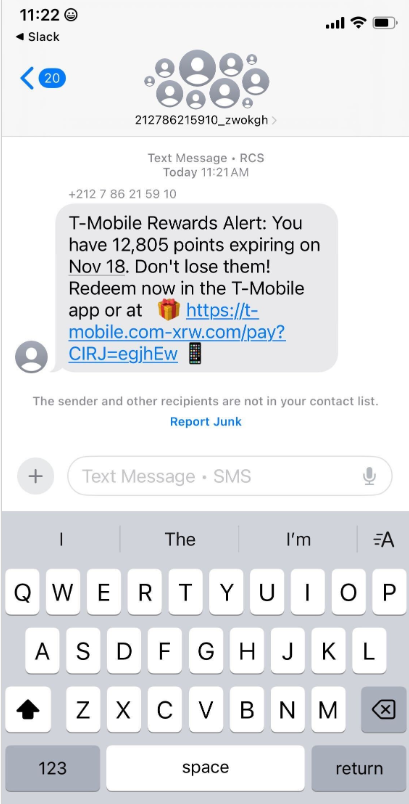
If you can actually see the bogus URL, great, but most are disguised, AFAICT.
The above site is com-xrw.com, NOT tmobile.com
WORSE, I copied the image to disk to scrape the text of the link, and Apple Preview and Quick Look made the damn link active, so the browser went to that site --- but Firefox reported it as a scam site and blocked it. Sometimes, I hate computers.
The last paragraph is key.
Just don't click on links in messages, and if there's any doubt (as there should be) go to the merchant's or institution's home page that you know is real (because you typed in its URL) and check things there.

 = new reply since forum marked as read