Welcome to DU! The truly grassroots left-of-center political community where regular people, not algorithms, drive the discussions and set the standards. Join the community: Create a free account Support DU (and get rid of ads!): Become a Star Member Latest Breaking News Editorials & Other Articles General Discussion The DU Lounge All Forums Issue Forums Culture Forums Alliance Forums Region Forums Support Forums Help & Search

Occulus

(20,599 posts)
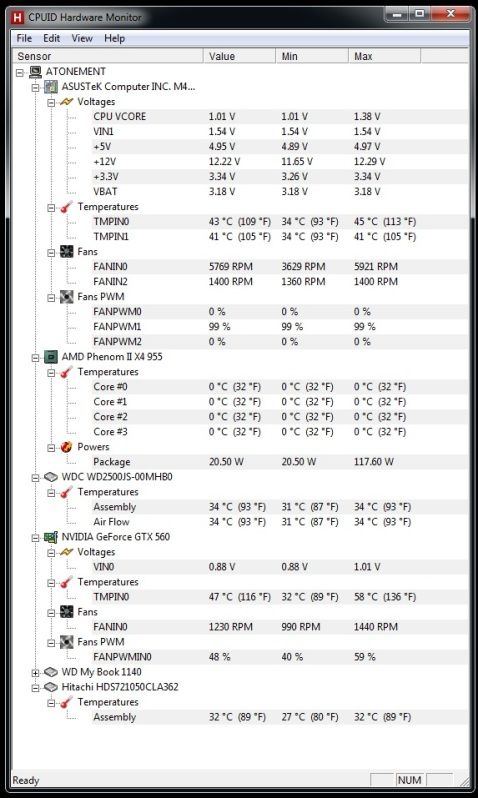
5. Well, here's a screenie after playing Diablo 3 for about ten minutes or so
Wed May 30, 2012, 11:03 AM
May 2012

Sorry for the large image, if it's too big:


Those CPU cores SHOULD NOT be reading 0 degrees. That much I do know. After I post this I'll open up the case and check to see if I forgot to plug in something like a CPU sensor, or if it got pulled out a bit.

When the PC freezes, the hard drive thrashes around for about thirty seconds to a minute (solid red light), the system going unresponsive during that time, and then BOOM- BSOD. Now, I just recently reinstalled Windows (everything seemed fine afterward), but then, bit by bit, the BSODs are becoming more common, WITHOUT file loss or corruption. I thought it was my hard drive, so I ran a couple utilities on on each to check for bad blocks/sectors, without any luck. My temps seem to be in range, and all my fans are running. The only thing I haven't been able to check is the RAM (Memtest86 won't boot from my stick for some reason), but that doesn't seem to be the problem anyway.

The only thing I can think of is that I also recently reapplied a layer of Arctic Silver to my CPU when I blew out/cleaned the heat sink (cats and cat hair really don't mix with heat sinks!). Could I have damaged/bent a pin on the CPU? Could that be the problem?

It ticks me off because I just built this PC not that long ago, and I should not be getting BSODs at this point. It would make me feel a lot better to know which piece of hardware is becoming ill, because I just can't afford to randomly replace components until the problem disappears... but every utility I've tried to use to track the problem down is just smiling and saying "everything's fine, pal!"

My bet's on a failing hard drive, but that's only an educated guess at this point.


Recommendations

0 members have recommended this reply (displayed in chronological order):

Latest Discussions»Help & Search»Computer Help and Support»I need a program that can...»Reply #5