Welcome to DU! The truly grassroots left-of-center political community where regular people, not algorithms, drive the discussions and set the standards. Join the community: Create a free account Support DU (and get rid of ads!): Become a Star Member Latest Breaking News Editorials & Other Articles General Discussion The DU Lounge All Forums Issue Forums Culture Forums Alliance Forums Region Forums Support Forums Help & Search

Computer Help and Support

In reply to the discussion: router help [View all]

discntnt_irny_srcsm

(18,783 posts)
1. I need some more info
Thu Mar 28, 2013, 09:32 PM
Mar 2013

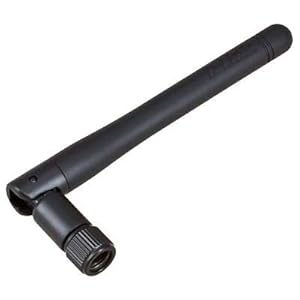
About the first thing to check is if the PC has a WiFi adapter. Most desktops don't. Look for a 2 dbi antenna on the back. It looks like this:


I'll also need to now if this pc is running windows and which version.

and welcome

Recommendations

0 members have recommended this reply (displayed in chronological order):

router help [View all] Laura PourMeADrink Mar 2013 OP
I need some more info discntnt_irny_srcsm Mar 2013 #1
MY STUFF Laura PourMeADrink Mar 2013 #2
As far as I can tell... discntnt_irny_srcsm Mar 2013 #3
thanks so much DIS !!! Laura PourMeADrink Mar 2013 #6
You're welcome discntnt_irny_srcsm Mar 2013 #7
yep sounds like you have no wifi. Phillip McCleod Mar 2013 #4
The TPLink adapter he recommends is 19.95. Unfortunately Laura PourMeADrink Mar 2013 #5
Cable Company ballardgirl Apr 2013 #8
interesting...thanks for that idea ! Laura PourMeADrink Apr 2013 #9
Latest Discussions»Help & Search»Computer Help and Support»router help»Reply #1